
One Up Puzzle is Rodolfo Kurchan’s daily number-placement game, where walls divide a grid into overlapping horizontal and vertical segments. Fill each segment with the numbers from 1 up to its length, using each number once in that segment and placing them in any order.
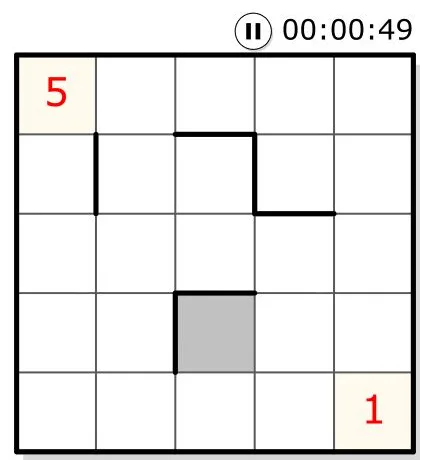
On October 24, 2026, we completed the first 5×5 Practice board in a desktop browser, including a full solve inside an embedded player. Its two given numbers left most of the work to the walls: a seemingly empty square could already be forced by a very short segment.
Count the cells between walls
A three-cell segment needs 1, 2 and 3; a five-cell segment needs 1 through 5. Every square belongs to both a horizontal segment and a vertical segment, so its number must satisfy both. This matches the rules published by Kurchan.
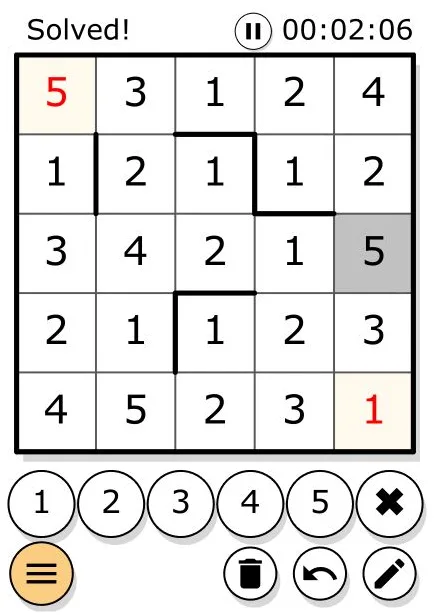
The crucial distinction from standard Sudoku is the boundary of the group. A whole row does not necessarily share one set of numbers. In our practice board, the second row was split into a single cell and two pairs. That allowed three separate ones in the same row, each belonging to a different segment. Treating the whole row as a Sudoku row would rule out valid placements.
There is also no requirement to arrange a segment in ascending order. Counting its cells tells you which numbers it needs, not their sequence.
Start with a short segment, then follow its crossing
The isolated first cell of the second row had to be 1. Another one-cell segment forced the third cell of the top row to be 1. These placements gave us useful anchors before tackling the longer stretches.
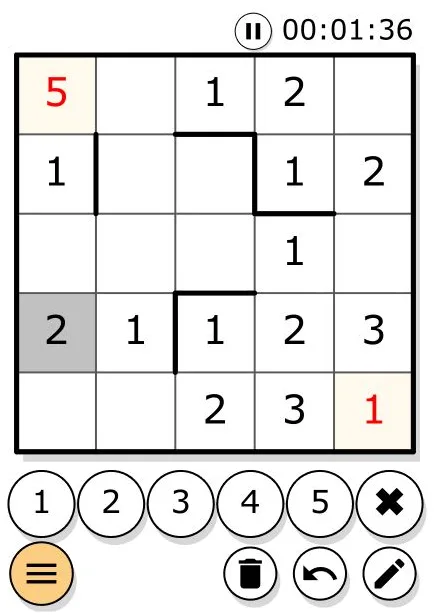
The fourth cell of that top row sat in a two-cell vertical segment, restricting it to 1 or 2. Because the top horizontal segment already contained 1, the crossing had to be 2. That left 1 underneath it, and the adjacent two-cell horizontal segment then needed 2 in its remaining square.
This is a useful opening method for the tested board: identify a short segment, work out its permitted numbers, and check how the perpendicular segment narrows them. After placing a number, revisit its crossings. We used the same process to fill the longer segments and eventually received the “Solved!” message above the grid. It does not establish that every daily board can be finished with these introductory deductions.
What happens when a number conflicts?
During the solve, we entered 1 into the third cell of the bottom row, which already had a given 1 at its far end. Thin red diagonal marks appeared on the conflicting cells. Changing our entry to 2 cleared those marks, and we continued playing.
That feedback helped locate a broken rule, but an unmarked entry still needed reasoning. We did not treat the absence of a warning as proof that a number belonged in the final solution.
We selected cells and entered digits with the keyboard, moved using arrow keys and WASD, and tested undo. The visible controls also include number buttons, deletion and a pencil icon. The help dialog documents notes shortcuts, although we did not test note-taking during this run.
Use Practice to learn the boundaries
The Learn area listed ten 5×5 practice boards alongside additional event puzzles. The first practice board was accessible without signing in, making it a concrete starting point for learning how walls change the groups. Only that first board was completed.
The daily entry displayed puzzle #948, an 8×8 grid, during our visit. We did not complete it, so this review cannot judge its difficulty or typical solving time. The practice timer included inspection pauses and is not a clean speed benchmark. Mobile controls, account progress and the daily reset time also remain untested. On the main page, advertising could obstruct the game area; the captured practice views keep the board readable.